

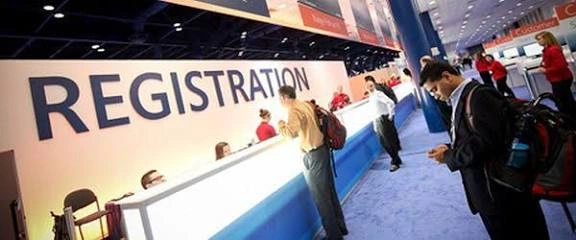
Event technology rental in Dubai means hiring devices, networks and interactive equipment for the days you need them, instead of buying them. Most events rent four things: devices (iPads, laptops, phones), connectivity (WiFi), registration kit (scanners, badge printers, kiosks) and engagement tech (screens, photo booths, AI robots). Prices depend on quantity, days and setup, so ask for a quote that includes delivery, on-site engineers and collection.
What event technology can you rent in Dubai?
Event technology covers anything electronic that helps you run, power, secure or entertain an event. Here is what planners most often rent, grouped by job.
What you need | What to rent | Typical use |
|---|---|---|
Guest check-in | Event registration kits: iPads, kiosk stands, badge printers, QR scanners | Conferences, exhibitions, galas |
Delegate devices | iPads and tablets, laptops, MacBooks | Training, exams, voting, surveys |
Staff and field devices | iPhones, Samsung Galaxy phones | Scanning, payments, team communication |
Internet | Event WiFi with dedicated bandwidth | Exhibitions, festivals, streaming |
Displays | TV screens, touch screens, LED screens, projectors, digital signage | Stage content, wayfinding, brand walls |
Printing | Laser, label and badge printers | Badges, tickets, documents |
Guest engagement | Photo booths, 360 video booths, VR and AR gaming | Brand activations, product launches |
AI experiences | Crowd magnets at expos and gala nights |
If you want everything in one package, Event in a Box Dubai bundles the main items with delivery, setup and engineers. You can also browse the full product range.
What is AI event technology, and is it worth renting?
AI event technology is equipment that creates content or reacts to guests on its own, such as a robot that draws a portrait, a camera rig that produces slow-motion video, or a booth that turns a photo into a themed image. It is worth renting when you want guests to queue, film and share, because the experience itself becomes your marketing.
AI option | What guests get | Best for | Plan for |
|---|---|---|---|
A slow-motion cinematic clip, ready to share | Galas, launches, red-carpet entries | Floor space, lighting, a branded backdrop | |
A line portrait drawn by a robot arm | Exhibitions, brand booths | Drawing time per guest, queue length | |
A robot that greets, entertains and answers questions | Lobbies, stands, conferences | Network, scripted content, staff to supervise | |
AI photo booth | A photo turned into a themed or stylised image | Activations, festivals | Branding, print or share options, privacy notice |
A branded game or demo | Product demos, tech expos | Headsets, hygiene, supervision |
How to decide whether an AI experience fits your event
- Start with the goal. Leads, social reach, dwell time or sponsor value? Each points to a different option.
- Count your guests. A robot that serves one person every minute produces about 60 guests an hour at best. Multiply by your opening hours before you book.
- Plan the data. If the experience collects photos, faces or contact details, tell guests what you collect. Read our guide to event data privacy in the UAE before launch.
- Plan the network and power. AI robots and booths need a stable connection and mains power. See how many access points an exhibition hall needs and our charging plan guide.
- Capture the result. Ask how guests receive their output (print, QR code, email) and whether you get a report of shares and sign-ups.
How much does event technology rental cost in Dubai?
There is no single price, because the cost depends on what is rented, for how long and how it is set up. Five things move the quote the most:
- Quantity and days. Rates usually fall per unit as quantities rise, and multi-day hire costs less per day than a single day.
- Delivery and setup. Venue, floor access, time of day and the number of engineers on site change the price.
- Configuration. Pre-loaded apps, kiosk mode, branding and badge printing add preparation time.
- Connectivity. Dedicated bandwidth and the number of access points drive WiFi cost.
- Support level. A technician standing by all day costs more than remote support.
Item | Typical unit | Rate per day (AED) | Notes |
|---|---|---|---|
iPad (incl. charger) | per device | From 49 AED | Kiosk stand priced separately |
Laptop (Windows or MacBook) | per device | From 99 AED | Configured to your image on request |
iPhone or Samsung Galaxy phone | per device | From 79 AED | SIM and data available |
Event WiFi | per access point or per bandwidth tier | From 499 AED | Site survey recommended |
Badge printer | per unit | From 1999 AED | Badge stock and ribbons extra |
55 inch TV screen with stand | per screen | From 199 AED | Larger LED walls quoted by size |
Photo booth or 360 booth | per booth per event | From 999 AED | Attendant and props included or extra |
AI GlamBot or SketchBot | per unit per event | From 2999 AED | Operator included or extra |
A quote should list delivery, installation, on-site support, collection and any damage cover as separate lines, so you can compare suppliers fairly.
What should you rent for each type of event?
Event type | Core rental | Add if the budget allows |
|---|---|---|
Conference | Registration kit, WiFi, screens, delegate tablets | Live voting, live streaming, AI robot at the lobby |
Exhibition or trade show | Lead-capture devices, WiFi, signage | AI SketchBot, VR demo, photo booth. See exhibition lead capture |
Gala or awards night | Check-in, screens, sound-linked displays | AI GlamBot at the entrance, photo booth |
Exam or training room | Laptops, WiFi, printers | Spare devices, a technician on site |
Product launch | Screens, AR or VR, photo booth | AI robot host, live streaming |
Festival or outdoor event | Scanners, power, connectivity | Cashless payment devices, signage |
When should you book event technology in Dubai?
Book as early as your dates are fixed, and no later than four weeks before large events. Peak weeks in Dubai, such as major exhibitions, fill the most popular equipment first.
- 4 weeks before: confirm quantities, venue access and network needs. Ask for a site survey if the venue is large.
- 2 weeks before: send final guest numbers, branding files, app or kiosk requirements and badge designs.
- 1 week before: approve the layout, power points and delivery window. Test any custom content.
- Day before or morning of: delivery, setup and a full test with your team.
- During the event: an engineer on site and a named phone contact.
- After the event: collection, a count of devices, and your data export.
What should you ask an event technology rental company?
- Are devices tested, charged and configured before delivery?
- Is an engineer on site, and for how many hours?
- What happens if a device fails? Is there a replacement on the day?
- Does the quote include delivery, setup, collection and damage cover?
- Can you see photos or past work for similar events in Dubai?
- Who owns and stores any guest data collected on your devices?
- What are the cancellation and change terms?
Common mistakes when renting event technology
- Booking devices but not the network. Devices without a reliable connection fail in front of guests. Plan WiFi first.
- Ignoring power. Count sockets, watts and charging. Our event device charging station guide shows the maths.
- Choosing a badge format late. Decide on QR or RFID early. See QR code vs RFID event badges.
- Long forms at check-in. Use only the fields you need. Read event registration form best practices.
- Collecting data with no plan. Know what you collect, why and for how long.
- Booking too late. Late bookings limit choice and add rush fees.
Event technology rental checklist
Before booking
- Event dates, venue, hours and expected guests
- Goal for each device or experience
- Network, power and floor-plan needs
- Budget with delivery, setup and support included
Before the event
- Branding and content files sent
- Badge design and guest list approved
- Delivery window and venue access confirmed
- Engineer and contact names saved
On the day and after
- Full test one hour before doors open
- Spare devices on hand
- Devices counted and collected
- Data exported and shared with the right people
Plan your event technology with Geeks Evolution
Geeks Evolution supplies event technology rental in Dubai and across the UAE, from iPad and laptop rental to event WiFi, registration kits and AI experiences. For a complete package, see Event in a Box Dubai. Tell us your dates, venue and guest numbers, and we will recommend what to rent. Request a quote.
Frequently asked Questions
Event technology rental is hiring devices, networks and interactive equipment for the length of an event instead of buying them. It typically includes iPads, laptops, WiFi, registration kits, screens, photo booths and robots, delivered, set up, supported on site and collected afterwards by the supplier.
Prices depend on the equipment, quantity, number of days, delivery and on-site support. Rates per unit usually fall as quantities rise. Ask for a quote that lists delivery, setup, support, collection and damage cover separately so you can compare suppliers fairly. Send your dates, venue and guest numbers to get an accurate figure.
Book as soon as your dates are fixed, and no later than four weeks before a large event. Peak weeks, such as major exhibitions, fill popular equipment first. Late bookings limit choice and can add rush fees, so confirm quantities, venue access and network needs early.
AI event technology is equipment that creates content or reacts to guests automatically. Examples are a robot that draws portraits, a camera rig that makes slow-motion clips, a booth that creates themed images and a robot host that answers questions. These experiences give guests something to film and share.
It is worth it when you want queues, social shares and longer stand visits. Decide your goal first, count how many guests the experience can serve per hour, and plan for power, network and an operator. Pair it with lead capture so the attention turns into contacts.
It should, but check the quote. A good rental includes tested and pre-configured devices, delivery, installation, an engineer on site and collection. Ask what happens if a device fails on the day and whether a replacement is held ready. Extras like branding, kiosk setup or printing may be priced separately.